


- At the ongoing Google I/O conference, senior director of product Aparna Chennapragada showed how Google is “combining the power of the camera and computer vision with Streetview and Maps to reimagine walking navigation.”
- In her presentation, Chennapragada noted how users would often have to move around in the real world to line themselves up with the blue dot marking their location in Maps. To avoid any such confusion, Google Maps will instead display blown-up 3D directions such as lit-up arrows and precise steps like “6th street is 100 feet away.”
- Meanwhile, a smaller version of the traditional Maps experience will be displayed on the lower half of the screen, should it be needed. Additionally, the demo showed that panning the camera around the streets would automatically highlight points of interest nearby, such as cafés or retail stores.
- Finally, Chennapragada said that “just for fun,” the Maps team has also been experimenting with a digital avatar that can help further guide users, with a cartoon fox shown off as an example.

Google announced many new software treats at Google I/O. Aparna Chennapragada introduced one of the best new features: visual guidance and Visual Positioning System in Google Maps Navigation.
We’ve all had been delayed figuring out Google Maps Navigation before — “am I going the right direction?” Google Maps can now use your camera to identify your surroundings, visually communicate your route right in front of your eyes!

Tap a button to activate visual view and then just point your camera where you need to go to see relevant info. You will see your surroundings with an overlay of Maps information for nearby business, arrows pointing you in the direction you need to go, with a small map at the bottom to remind you where you are headed. This is a powerful addition to Google Maps and Street View.
Google’s even playing with the idea of putting a character on the screen as an augmented reality tour guide. In the demo, it was a little fox.
Visual Positioning System – VPS
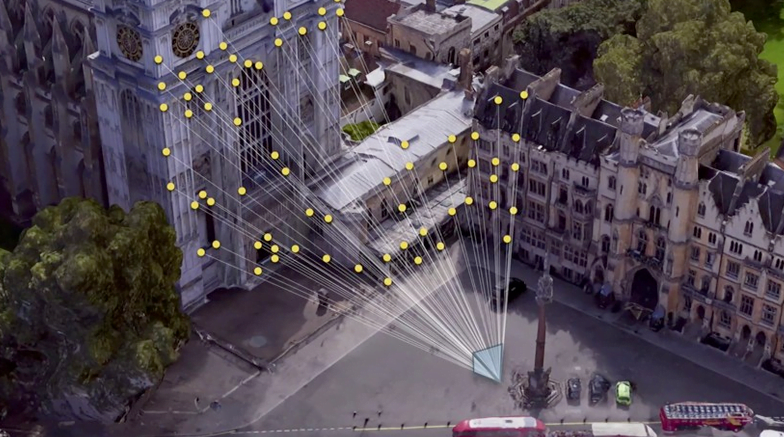
When your GPS is not enough, the new visual system in Google Maps can also use the newly coined Visual Positioning System (VPS) feature. The VPS uses your phone’s camera and Google’s extensive back-end data to analyze your surroundings to identify where you are with greater accuracy.
A few members of our team members are already cheering about this. They live in densely populated urban areas with tall buildings and often complain of GPS drift and other hassles when navigating. The new visual systems are made just for people like them.
Sadly, Google did not mention when these new Maps features would become available. We will be sure to update when we learn more.
Google has an indoor positioning tech in the works, called VPS

Google has announced it’s working on a service to offer detailed indoor location positioning using its Tango 3D sensing computer vision tech.
“One thing we’ve seen clearly is that AR is most powerful when it’s tightly coupled to the real world, and the more precisely the better,” said Clay Bavor, speaking at Google’s I/O conference today. “That’s why we’ve been working with the Google Maps team on a service that can give devices access to very precise location information indoors.”
Bavor described the feature as “kind of like GPS” but instead of talking to satellites — which isn’t necessarily viable given indoor reception issues — the cameras on a Tango device triangulate position based on “distinct visual features in the environment”.
[blockquote]We think it’s going to be incredibly useful in a whole bunch of places[/blockquote]Google’s name for the tech is “Visual Positioning Service” — or VPS.
